


A+ World Map Editor Sandbox
4.2189.00 Reviews
App Specs
- Version
- 2.15-build-20260826.1310
- Updated On
- License
- Free
- Downloads
- 500,000+
- Developer
- App4Joy
- Categories
- Trivia
- Platform
- Android
Screenshots
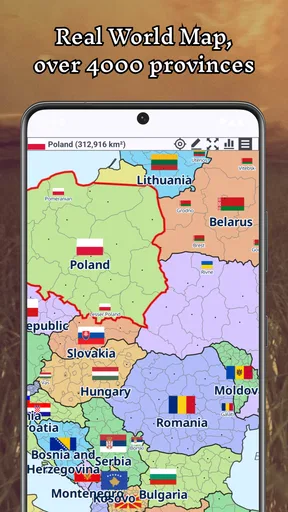
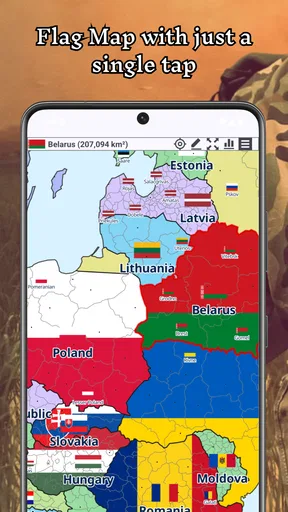
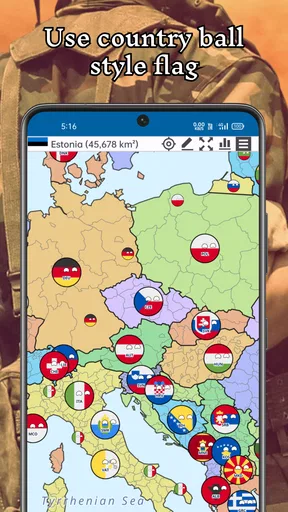
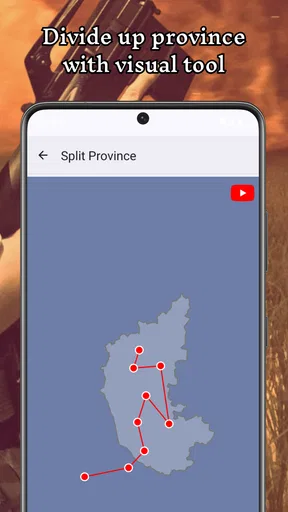
 Analysis by AppCompare
I tend to think of map games as either quizzes that reward memorized capitals or sprawling strategy games that take hours to learn. A+ World Map Editor Sandbox sits in a more creative space: it invites you to reshape a map and play with the idea of how borders and territories might change. That makes it appealing when I want a geography-flavored activity without committing to a full campaign or a timed trivia round.
Where the game fits today
This is a free trivia game from App4Joy, released on December 14, 2024. It has a 4.2 average from around 6,000 ratings, and over 500,000 installs. Those figures suggest it has found an audience, but the more useful question is whether its particular blend of map editing and playful world-building suits the way you like to spend time on your phone.
Its current version is 2.04-build-20260604.1721, and it runs on Android 8.0 or later. The Everyone age rating makes it an approachable option for younger players as well as adults, especially if a family wants a casual activity around geography. I would still treat it as a creative game rather than a structured course: changing a map can prompt curiosity, but it is not the same as a guided lesson that checks your knowledge step by step.
The central appeal is the freedom to alter a world map, experiment with borders, and imagine new political arrangements. I find that premise more inviting than a standard quiz when I am in the mood to explore rather than prove what I already know. A quick session can start with a small change, while a longer one can become a personal world-building project.
What the version history can—and cannot—tell you
The release date and current version give a useful point of reference for anyone returning to the game or deciding whether to install it. They show that the app has a current version beyond its initial release, but a version number by itself does not tell me which tools changed or whether a particular old map behaves differently. I would avoid assuming that a specific feature is new just because the version has advanced.
For someone who already has it installed, the practical approach is to open an existing project after updating and check that the map still looks the way you expect before making major edits. If you use a map for a class activity or a personal project, keep a separate copy of the original idea before experimenting. That is a sensible safeguard for any editor, and it matters more when you have spent time arranging a fictional world than when you are simply testing a quick border change.
Who will enjoy reshaping the map
I can see this working well for curious players who enjoy looking at maps and asking “what if?” A student might use it to make an alternate-history sketch, while a teacher could use a custom map as a conversation starter about borders, regions, and how maps represent places. At home, it can also be a low-pressure way to get children talking about geography together, provided an adult helps distinguish playful inventions from real-world facts.
Worth Reading Before You Choose

Flipboard Shows What News Apps Must Do Beyond the Feed

Switching to Android Auto Means Rethinking Your Driving Routine

Google Calendar Makes a Crowded Week Easier to Manage

Ludo King Makes the Most of the Minutes Between Plans

Baby Panda World Brings Quick Play to Modern Phones, but Its Game Library Feels Busy

ESPN’s Live Game View Makes Following Close Games Easier
One useful way to approach a project is to make a copy of the idea in your notes first: decide what you want to change, then make those edits deliberately rather than endlessly tapping at the map. This gives a session a purpose and makes it easier to compare the original arrangement with your imagined one. It also helps if you are using the game to explain a concept to someone else, because you can focus the discussion on one change instead of letting the map become a collection of unrelated edits.
A realistic use might be a short evening session before a geography class: I could choose one region, alter its boundaries for an alternate-history scenario, and use the result to ask what might change if the political map were different. Another player might simply redraw familiar areas for fun. In both cases, the value comes from making decisions and explaining them, not from treating the game as an authoritative atlas.
How it compares with geography quizzes
Compared with a conventional geography trivia game, this title is less about rapid recall and more about creative control. A quiz is usually the better choice if you want to practice capitals, flags, or country locations with clear right and wrong answers. Here, the open-ended premise is the attraction, but it also means players who want a defined score, a lesson plan, or a sequence of increasingly difficult challenges may find the experience less satisfying.
It also differs from a full strategy game. The appeal is the map itself and the possibility of changing it, rather than managing a long list of economic or military decisions. That lighter focus can make it easier to pick up for a brief break, but it is not the right substitute for a deep campaign if you want complex systems and sustained strategic consequences. I would choose according to the mood: quizzes for practice, strategy games for long-term planning, and this one for imaginative map play.
It is worth keeping that distinction in mind if you are installing it for a child or a classroom. A creative map can encourage questions, but it should not be the only source for learning where real borders are or how they have changed. Pairing play with a trusted atlas or class material makes the activity more useful and helps avoid confusing a fictional edit with a factual map.
Getting Started with Your World
When you first open A+ World Map Editor Sandbox, you're greeted with a straightforward interface. It’s not cluttered, which is a relief because some mapping apps can feel like you're trying to crack the Da Vinci Code just to get started. Here, everything is laid out nicely, with clear icons and a toolbar that’s ready to help you create your masterpiece.
The app offers several templates to kick things off, or if you're feeling adventurous, you can start from scratch. I chose a blank map because I wanted to see how creative I could get. The tools are intuitive, and even if you’re not a geography whiz, you’ll get the hang of it pretty quickly.
Tools and Features: Building Your World
The app is packed with a bunch of cool features that make map-making a breeze. You can add countries, borders, and even tweak the terrain to your liking. Want to turn a desert into a lush forest? No problem! The terrain editing tools let you switch things up with just a few taps.
One feature I particularly enjoyed is the ability to add custom labels. This means you can name your continents, oceans, or any other geographical features. I had a blast naming my islands after friends and family—it’s a fun little touch that makes the map feel personal.
Another standout feature is the layer system. You can work with multiple layers, which allows for more detailed and complex maps. This is great for those who want to add a lot of information without cluttering the main map. You can hide or show layers as needed, keeping your work organized.
Customization at Your Fingertips
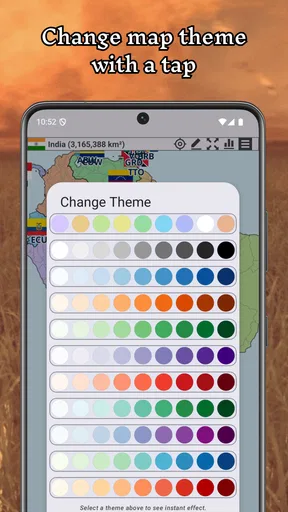
Customization is king in this app. Besides the basic geographical features, you can play around with colors, patterns, and textures. Whether you want your map to look like an antique parchment or a sleek modern graphic, the options are there. I spent an embarrassingly long time just experimenting with different styles!
The app also lets you import external data. This means if you have specific geographical data you want to incorporate, you can do so seamlessly. This feature is a game-changer for educators or anyone using the app for more serious purposes.
Making a project easier to manage
For a larger map, I would start by separating the idea into a few clear visual jobs rather than trying to perfect everything in one pass. I might first settle the borders, then decide which areas need labels, and only then spend time on color and texture. The layer system is useful here because it lets you keep different kinds of information apart; hiding a layer while you work can make it easier to spot whether the underlying map still reads clearly.
There is a trade-off between detail and legibility. A label that makes sense to me while editing may become hard to read once the map is full of boundaries and styling. I would add names only where they help explain the map, and use a consistent naming approach for fictional places. That small bit of restraint can make a homemade map feel considered rather than crowded.
If you are experimenting with external data, I would treat that as a more deliberate workflow than casual editing. Check the source and format of the material before building a project around it, and try a small test first. Importing data can be valuable for an educational or personal project, but it also adds complexity that a player who only wants a quick creative diversion may not need.
Sharing and Exporting Your Masterpiece
Once your map is ready, the app provides several ways to share your creation. You can export your map in various formats, making it easy to print or use in presentations. The sharing options are straightforward, allowing you to showcase your work on social media or send it to friends and family.
The app also supports cloud saving, which is a lifesaver if you’re working on a big project. You can access your maps from any device, ensuring you never lose your progress. This is great for those of us who like to tinker with our creations over time.
Small practical checks before you commit
If a map matters to you, I would test the sharing or export route before spending a long time polishing it. A quick trial helps you see whether the result suits the way you plan to use it, such as showing it to a friend or including it in a presentation. It is a simple habit that can prevent a frustrating last-minute discovery about how your finished work appears outside the editor.
Cloud saving can make it easier to return to a project, but I would not assume that every workflow is automatic or identical across devices. Before switching devices or relying on a map for a deadline, check that the version you need is available where you intend to use it. That is especially worthwhile for shared family or classroom projects, where several people may be handling the same idea.
For casual sharing, a finished map can be a conversation piece: send it to a friend and ask them to suggest a border change, or print it as a prompt for a storytelling activity. If your goal is professional cartography, however, I would compare the export options with the requirements of the final project before committing. A playful editor can be great for sketches without necessarily replacing specialist mapping software.
Where it may fall short
The freedom that makes the game enjoyable is also its main limitation. Players who need clear goals, frequent feedback, or a strong sense of progression may prefer a quiz with defined questions and results. Likewise, anyone seeking a dependable reference for current geography should use a dedicated atlas or educational resource rather than relying on a map they have edited for creative purposes.
There is also a learning curve in deciding how much detail to add. The basic idea is approachable, but making a large map coherent takes patience: borders, labels, terrain, and visual style all compete for attention. I would not recommend it to someone who wants a polished result instantly or dislikes open-ended tasks. Starting with a small region is more satisfying than trying to remake an entire world in one sitting.
Final Thoughts: Is It Worth It?
In a nutshell, A+ World Map Editor Sandbox is a fantastic tool for anyone interested in map-making. It combines ease of use with powerful features, making it suitable for both beginners and more advanced users. Whether you're an educator, a student, or just someone who loves maps, this app will keep you entertained for hours.
The app is available for download on both Android and iOS, and it’s definitely worth checking out. So, if you're ready to unleash your inner cartographer, give A+ World Map Editor Sandbox a try. Happy mapping!
My recommendation and what I would watch
I would recommend it to someone who enjoys inventing places, changing borders, and making a map that has personal meaning. I would skip it if my main goal were to memorize geography, verify real-world boundaries, or play a tightly guided game with a clear win condition. Those needs are better served by a focused quiz, a trusted atlas, or a more involved strategy title, depending on what I want from the session.
For an everyday test, I would make one small change during a break, add only the labels needed to explain it, and see whether I want to continue building. If I do, the editor offers room to turn that quick experiment into something more layered and distinctive. If I do not, I have still had a brief creative activity rather than an unfinished project that demands attention.
Going forward, the most useful things to watch are practical: whether future versions make editing or sharing smoother, and whether the game continues to suit the kind of open-ended map play that drew me to it. The version number is a current reference point, not a promise about what comes next. For now, its strongest case is simple: it gives geography fans a flexible canvas, while asking them to bring their own goals and patience.
Pros
- Highly customizable map features.
- Intuitive user interface.
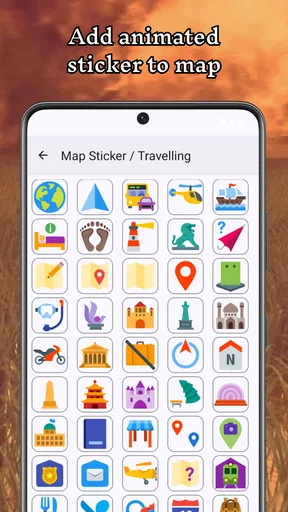
- Extensive symbol library.
- Supports offline use.
- Regular updates and improvements.
Cons
- Limited export options.
- Occasional lag on older devices.
- No real-time collaboration.
- In-app purchases for advanced tools.
- Requires a learning curve for beginners.
FAQs for A+ World Map Editor Sandbox
What is A+ World Map Editor Sandbox?
A+ World Map Editor Sandbox is a creative app that allows users to design and customize their own world maps. It offers a variety of tools for editing, coloring, and labeling maps to suit personal or educational needs. Ideal for geography enthusiasts and educators, it provides an engaging way to explore and visualize global data.
Is A+ World Map Editor Sandbox suitable for educational purposes?
Yes, A+ World Map Editor Sandbox is highly suitable for educational purposes. It allows teachers and students to interactively explore geography by customizing maps, adding labels, and highlighting regions. Its features make it a great tool for visual learning, enabling users to better understand spatial relationships and geographical data.
What features does A+ World Map Editor Sandbox offer?
The app offers a wide range of features including map editing tools, color customization, labeling options, and the ability to import/export maps. Users can also access pre-designed templates and utilize various layers to enhance their map creations. These features provide flexibility in designing detailed and informative maps.
Is the app user-friendly for beginners?
A+ World Map Editor Sandbox is designed to be user-friendly, with an intuitive interface that helps beginners easily navigate and utilize its features. The app includes tutorials and tooltips that guide new users through the map creation process, making it accessible even for those with no prior experience in map editing.
Are there any costs associated with using A+ World Map Editor Sandbox?
The app offers both free and premium versions. The free version provides basic features sufficient for casual use, while the premium version unlocks advanced tools and additional templates for more extensive customization. Users can choose based on their needs and budget, making it flexible for different user requirements.


